Image: NASA
Getting ready — the plugin is not on WordPress.org yet, and purchasing is not open. The pages here describe what ships.
Built by a media site, for its own posts.
Write thousands of posts and the site does not slow down. A link that dies tells you. A reader who will not buy from Amazon still gets somewhere to buy. Built from the far end of those problems, on a site that publishes every day.
Free · GPLv2 or later · Japanese included
WHAT A READER SEES IN THE POST
Drawn at the plugin's own measurements and default colours — 28px gutter, 20px gap, 120px thumbnail, 8px corners — so what you are looking at is the size the card really is.
Light however much you write
The editor and the admin screens open at the same speed on post 20 and post 20,000, so writing never gets slower the more you write. Nothing about the product is stored inside the post.
Uninstalling takes everything Affely wrote with it. No tables of its own, and no product data baked into your posts — so trying it costs nothing to undo.
The reader who never buys from Amazon, not lost
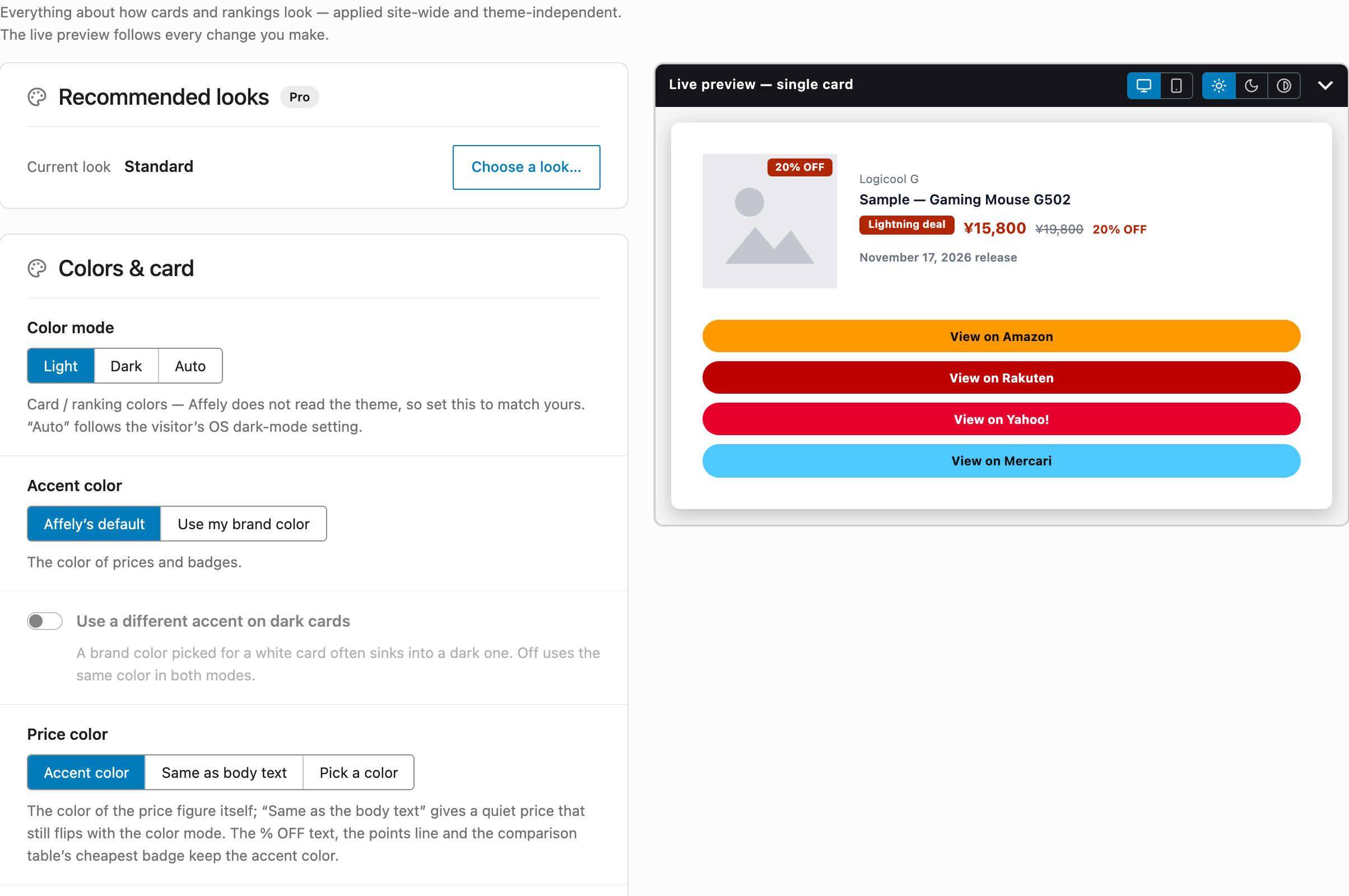
Amazon, Rakuten, Yahoo! Shopping, Mercari and one URL of your own. Each mall resolves through your direct ID or through Moshimo, and a mall you have set up is a mall that gets a button — so the reader who never buys from Amazon still buys from you.
Know which posts earn, by name
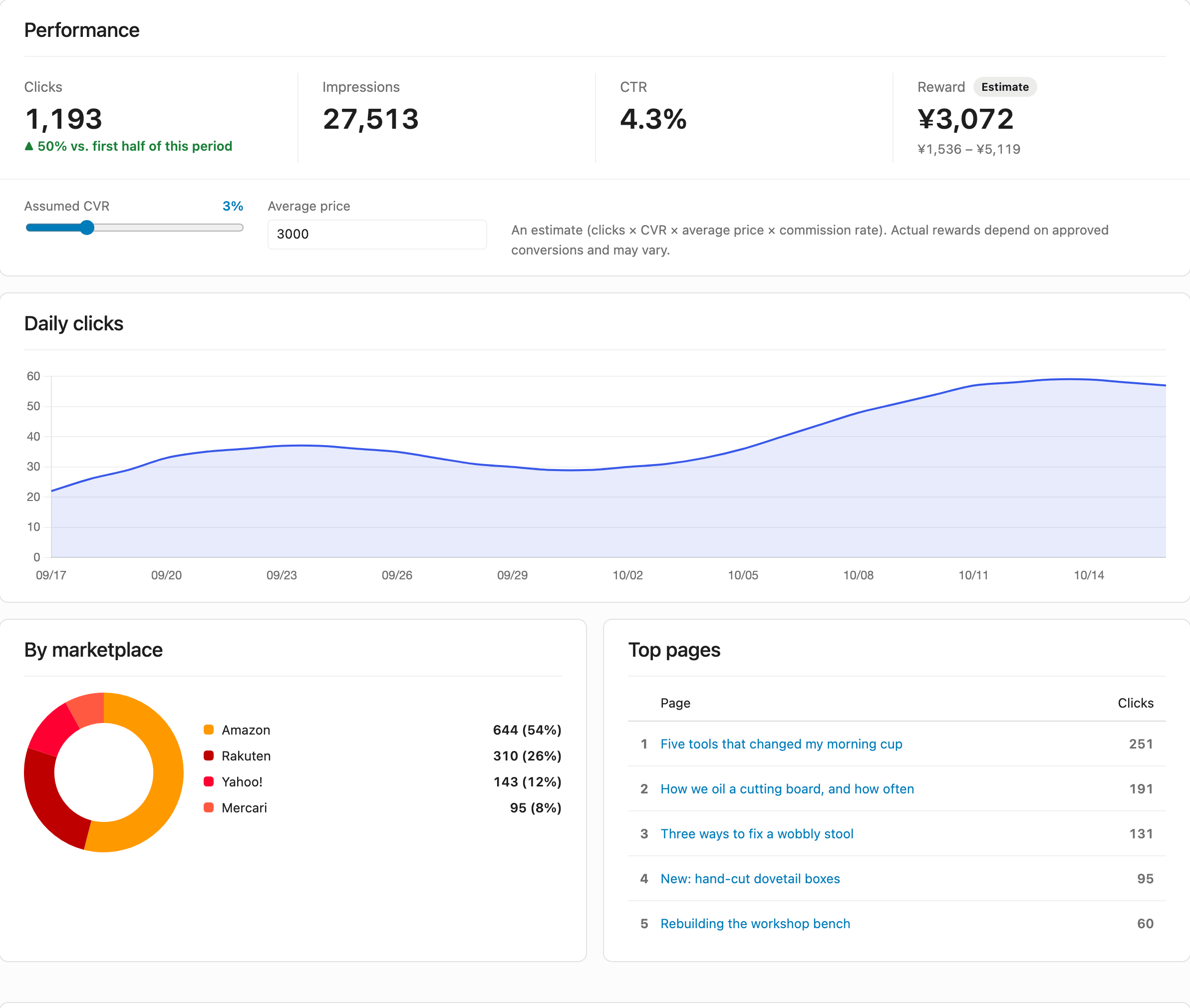
Clicks and views are counted and reported as CTR, split by marketplace, by page and by product, with an estimate of what they earned — so the post you rewrite next is chosen from numbers rather than a hunch.
Your back catalogue moves across as it is
Affely reads your content and sorts what another plugin left there into what converts automatically and what a person should look at — so switching costs you a screen, not a rewrite of every post.
Drop the block in, then pick what you want out of it
The five ways in are the five things it produces. Search for a product, tick the ones you want, and the block assembles the rest.
Product card
Feature one Amazon product as a rich card.
Manual ranking
Pick 1–10 products for a ranking (list / grid / table / carousel).
Price comparison
Compare one product across Amazon, Rakuten and Yahoo.
Category ranking
Auto-show a category’s live Amazon bestsellers, refreshed automatically.
Rakuten ranking
Show the ranking Rakuten publishes itself, for a genre you choose.
A ranking comes out as a list, a grid, a comparison table, a carousel, or plain text that takes its styling from your theme. Product images can be turned off in every layout that has them, and the title becomes a real H2–H4 so it joins the article outline.
Or, in a classic editor: [affely_pro asin="B0XXXXXXXX"] · [affely_pro_rank ids="B0XXXXXXXX,B0YYYYYYYY" type="table"]
Decide once, then just write
Policy is decided once in Settings → Affely; anything a single post needs differently is overridden on the block. That split is deliberate — changing your mind later is one screen, not one edit per post.
WHERE THE DATA COMES FROM
THE MALL BUTTONS
WHAT THE CARD SHOWS
HOW IT LOOKS
Discontinued or out of stock — found, and swapped out on the spot.
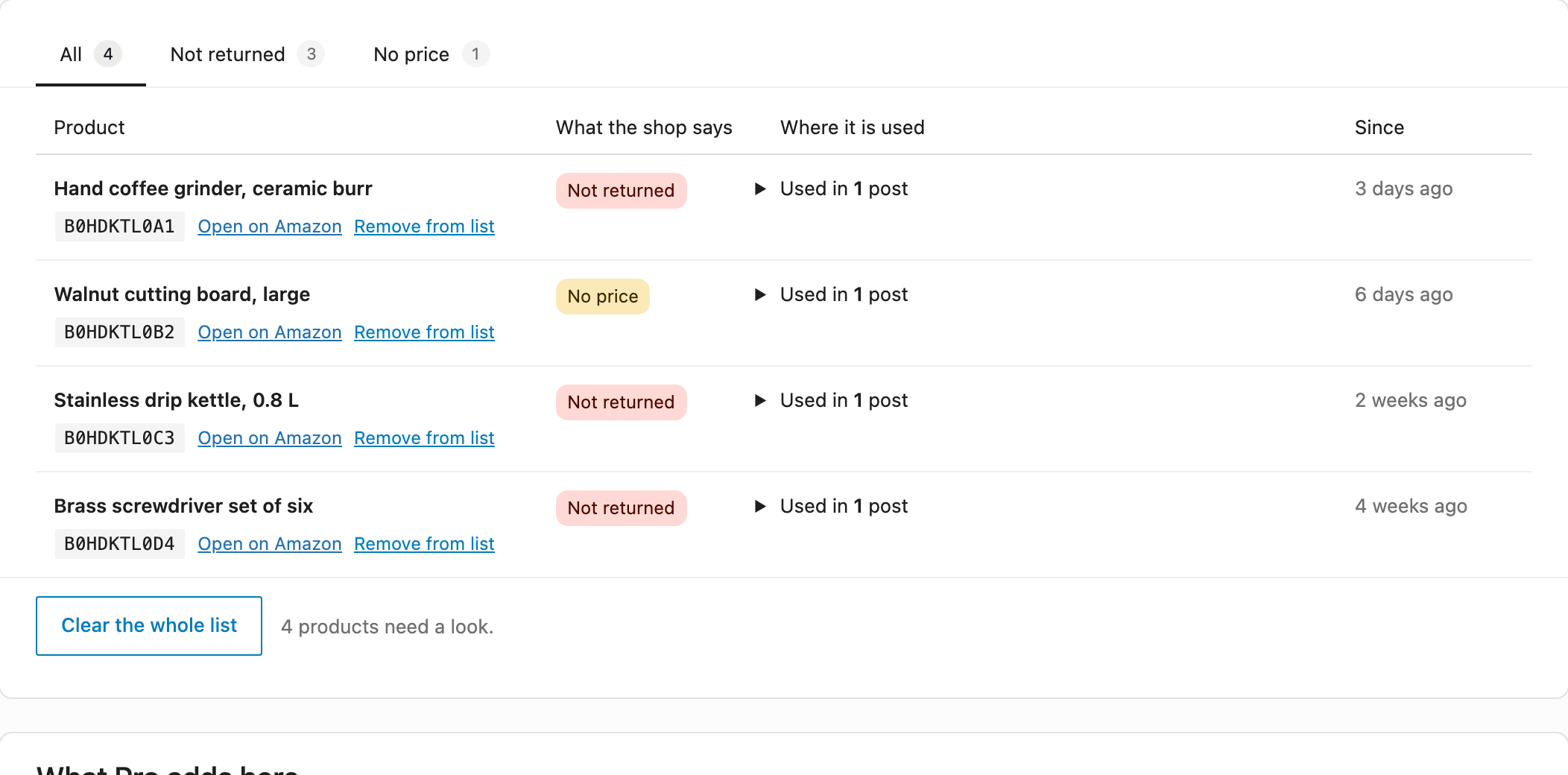
A product Amazon has stopped returning quietly drops one row out of a ranking. A product with no price is quieter still: the card renders exactly as before, and the link earns nothing. Affely records both.
The Health screen names the product, what Amazon said about it, and the posts still using it. In the editor, "Swap in another product" puts a replacement in the dead one's place — same position, everything else untouched.
With your own Creators API credentials, noticing works two ways: every card fetched records what Amazon answered, and once a week every product in your posts is checked in one pass — including the old posts nobody opens.
The block says so in the editor, selected or not — the block nobody clicks on is exactly the one that goes bad unnoticed.
A product out of stock is given a day before you hear about it, so a Saturday-night stockout that is back by Monday never interrupts you.
It all clears itself. The moment a product resolves again — you fixed it, Amazon restocked it — it leaves the list, and the menu carries the count while anything is left.
What to check before you decide
Every plugin that puts affiliate products in your posts can be asked the same things. Here is where Affely lands on each one.
You see the whole change before you press anything
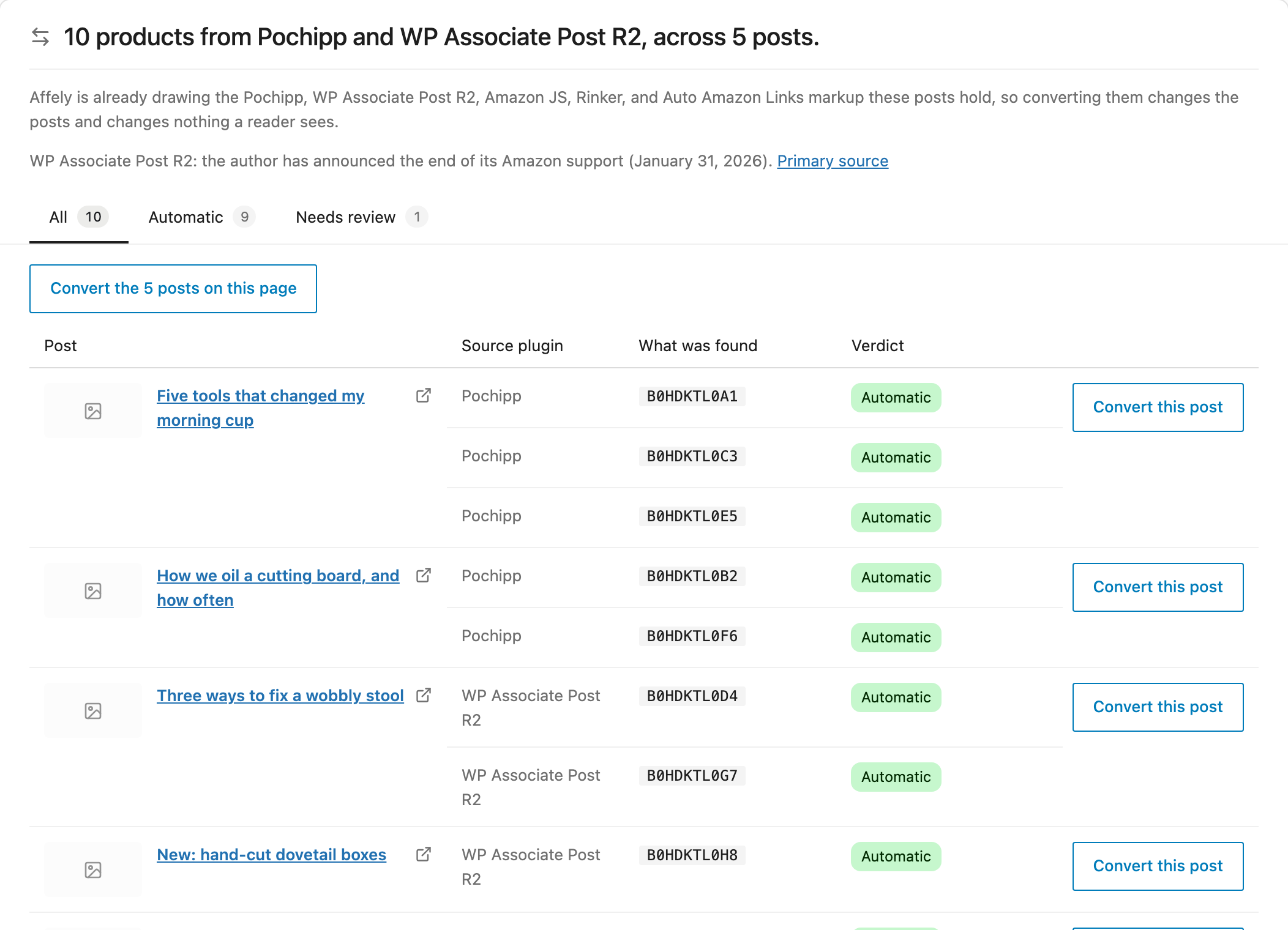
Affely → Migrate finds the product blocks Pochipp, WP Associate Post R2, Amazon JS and Rinker left in your content, along with every Pasted Amazon URL, and lays out what moving them would do — split into what converts automatically and what needs you. The first thing you see is the table; your content changes when you press the button, and not before.
Where each source stands
- Pochipp: updated (September 18, 2026) Source
- WP Associate Post R2: the author announced the end of its Amazon support (January 31, 2026) Source
- Amazon JS: closed on WordPress.org (January 5, 2023) Source
- Rinker: updated (May 10, 2026) Source
- Auto Amazon Links: closed on WordPress.org (November 7, 2025) Source
Measured on a 1,236-post site, Pochipp alone: 2,535 product blocks found, 95.9% of them carrying an ASIN and convertible whole.
Convert one post at a time, or a page of twenty. The screen re-scans after each run and shows what is left, so it is a dashboard rather than a one-shot button.
The version from before the migration is committed as a WordPress revision first, so any post can be rolled back from the editor. On a site that has revisions switched off, the migration screen says so before you start.
A block Affely cannot identify a product from is listed with the reason, and left exactly as it was rather than replaced by an empty card.
Modified dates are left alone, because nothing a reader sees was edited — and running the same post through twice does nothing the second time.
What a post looks like once that plugin is gone
WordPress prints a shortcode nobody registered as plain text, in the middle of the sentence it was written into. On a site whose old plugin has shut down, that is what readers have been reading. Affely takes the markup over the moment it is active — before any migration button is pressed.
If you are choosing on weight, this is where the shortlist starts.
[wpap service="with" type="detail" id="B0XXXXXXXX" title="Kestrel GX2 Wireless Gaming Mouse, 58g, 8K polling"]
Prices move, so check before you buy.
If you are choosing on weight, this is where the shortlist starts.
Prices move, so check before you buy.
Converting rewrites the post. What the page shows does not change — the stand-in draws the same bytes the migration writes.
What your site holds, and what it sends — both in full
Short enough to read in one sitting, and short enough to copy into your privacy policy as they are.
What a post holds
That is the whole list. The product JSON is cache — clear it and your posts are unaffected.
What a click sends
No visitor identity is sent — no IP address, no user agent, no cookie, no identifier of any kind. Batches go to your own site first and your server forwards them, so the Worker never sees the reader's connection either. A kill switch in Settings turns the whole thing off.
Affely Pro
There is one zip. The Pro code ships inside it, so upgrading is a licence key rather than a different download. What a licence opens is the data rather than the code: category bestsellers, live Rakuten and Yahoo! prices and the click report all arrive from Affely’s own server.
The free plugin is a whole product on its own: single cards in all four layouts, the mall buttons, Moshimo mode, sale badges, the featured pick, every design control and daily price refresh. Nothing in it is a demo that stops working. Pro adds the four below, plus the one-click looks on the design tab — the controls a look sets are all free; what it saves you is deciding them so they agree.
Rankings
Hand-picked rankings of 1–10 products, and category bestsellers that keep themselves current — as a list, grid, table, carousel or plain text. The bestseller ranking is one you never have to go back and re-order.
The multi-mall comparison table
The JAN code matches the same item on Rakuten and Yahoo! Shopping, and the three prices line up in one table — each row linking through your own affiliate IDs. The reader buys wherever it is cheapest, and every one of those doors is yours.
The click report
Clicks, views and CTR over 7, 30 or 60 days, broken down by marketplace, top pages and top products, against the previous period — the comparison that tells you whether last month's edit worked.
Fresher prices
The free tier refreshes once a day; Pro lets you set the interval from 60 seconds, so a sale price reaches your posts on the day the sale starts. Both stay inside the 24-hour window Amazon's display policy allows.
[checkout URL — to be confirmed]
What you need
PHP 8.4 or newer is recommended, and the test suite runs on 8.1, 8.2 and 8.4.
Where the data comes from
Enter your own Amazon Creators API credentials and your own server fetches the cards. The Affely Worker stays underneath for the three things a single site cannot serve itself: category bestsellers, other malls' prices and the click report.
Prices and images are cached for at most 24 hours, the ceiling Amazon's Creators API caching policy sets. Star ratings are left out: the Creators API in Japan does not carry them.